
MatchTracker 10 is our biggest under-the-hood upgrade in years, bringing a refreshed interface, smoother video playback on a wider range of hardware, and much faster exports in Presentations. This release also introduces Chart Benchmarking and Per90 Normalisation, new IMPECT formations, and even more data combinations & leagues available in the Download Manager - alongside other improvements and bug fixes.
Important Information
- macOS Tahoe is now supported. MatchTracker now supports macOS Tahoe, Sequoia and Sonoma. Older versions may encounter issues or be unable to install future updates.
- Intel Mac support ending. MatchTracker versions released after summer 2027 will require an Apple silicon chip on Mac.
- Updated hardware specs. Alongside this release, we've updated our Recommended Hardware Specs article - worth a look if you're planning new hardware.
Chart Benchmarking & Per90 Normalisation
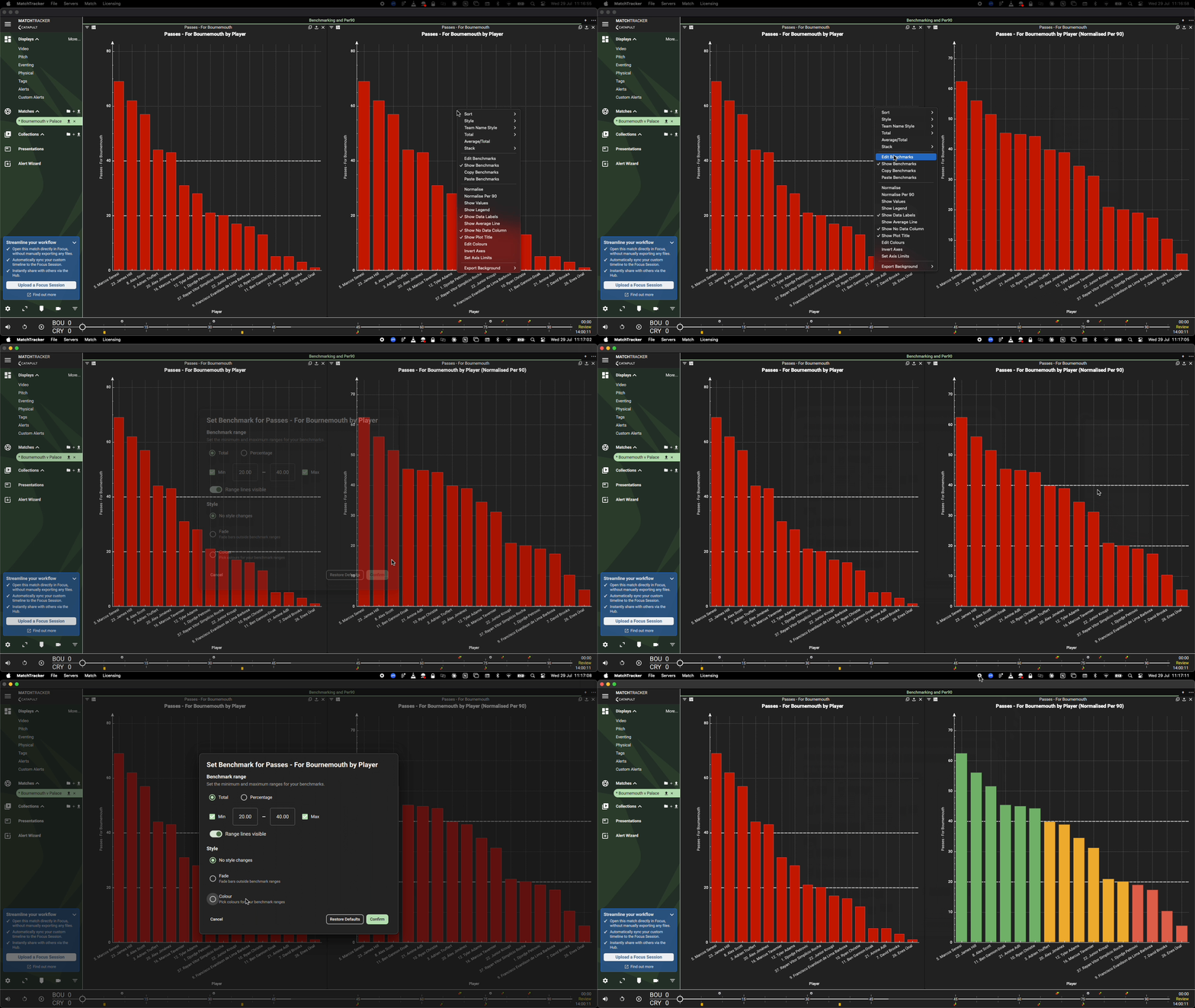
MatchTracker 10 gives analysts a way to define performance targets directly on charts and compare players and teams fairly regardless of minutes played - a powerful workflow available to use with your Live data or post match.
- Per90 Normalisation - a new Per90 option is available wherever chart Normalise appears. Player-level Per90 uses that player's own minutes played; team-level Per90 uses match minutes - so players and teams with different playing time can be compared fairly.
- Chart Benchmarks - set a performance threshold (e.g. "20 successful presses per match") directly on any chart via the new Edit Benchmarks option. Define a min, a max, or both, and choose how bars respond: no change, fade, or colour-coded zones (below/within/above benchmark, with a Flip Colours option for metrics where lower is better, e.g. Fouls Conceded). Benchmarks are saved with the workbook and carry over when it's shared.
New Features
- IMPECT formations - added support for 10 new IMPECT formations in the Formation Editor and corrected slot ordering on 15 existing formations, fixing incorrect player positions on the Whiteboard.
- Added support for IMPECT eventing data alongside Second Spectrum and StatsPerform positioning data
- New leagues added to the calendar year league list - available in the Download Manager: Brazilian Série B, Chile Primera División, Paraguayan Primera División, Colombia Primera A, Uruguay Primera División.
- Streamed Video is now enabled by default. Previously off by default, which meant no video streamed at all (including DVMS) unless a user manually turned it on.
- Faster background loading for HSV match video and workbook population when opening a match.
- Added support for Statsbomb eventing data alongside StatsPerform positioning data
- NWSL Hawk-eye positioning data now imports alongside IMPECT Eventing via Manual Import
- SkillCorner positioning data will now automatically sync to Kick Off, removing the need for a manual sync
- Added ability to filter the "Opp In Front" and "Opp. Def In Front" column
Presentations Video Export Improvements
- Added a "Fast Export" option to Presentations. The new option copies the source video snippet directly for tags with no annotations or overlays, producing exports much faster than the standard exporter. For 10 minutes of 720p/60 fps footage, typical export times are:
- ~2 seconds on Apple silicon MacBook Pros.
- ~4 seconds on Windows laptops equipped with modern dedicated NVIDIA GPUs or Intel iGPUs.
- The total time required to complete transcoded Presentations exports has been reduced by up to ~55%, depending on hardware — with the largest gains on Apple silicon Macs.
- Transcoded Presentations exports can now follow the Presentation's folder structure, either combining clips into a single video file per folder or exporting them as separate files organised by folder.
- Video exports no longer lock up the UI, so you can keep working while an export runs. Note that overall app performance may be slightly reduced during export.
- Added a right-click "Export" option for clips in both folder and row views in Presentations. This action performs the export with the last-used configuration.
Improved Video Handling
- Added support for additional hardware-accelerated video decoders — Intel QSV, Vulkan, Direct3D 11 / DXVA2 — alongside existing CUDA support.
- Hardware-accelerated video decoding now works on Apple silicon Macs for all files when "Prefer Hardware Accelerated Decoding" is enabled.
- Improved video playback performance of H.265 video.
- Added support for AV1 video.
Other Improvements and Bug Fixes
- Added the ability to rebuild the offline database from within MatchTracker
- Fixed: IMPECT penalty kicks now classify as Penalties in the Eventing and Shots display and appear in the Penalties Faced filter
- Fixed: IMPECT saved and caught shots no longer show as "Miss" in Shot Outcome. "Caught" shots added as a filter option
- Fixed: Pass Direction no longer defaults to "Forward" for IMPECT matches with no positioning data
- Fixed: IMPECT Won/Lost Aerial Duel qualifiers no longer attached to the same event
- Fixed: IMPECT Won/Lost Ground Duel qualifiers no longer attached to the same event
- Fixed: Formation editor not updating away team positions when filtered to Both Teams
- Fixed: Formation editor not updating when switching games via a table
- Fixed: Non-transcoded exports could produce clips of the wrong length
- Fixed: Changing chart axis limits to 3 or more disabled double-click-to-play video
- Fixed: StatsBomb players subbed at halftime showing as subbed during "prematch"
- Fixed: Sequence Start Type filter in the Passes table incorrectly classifying sequence start types
July 2026